
Q: What is a BIM file, technically speaking?
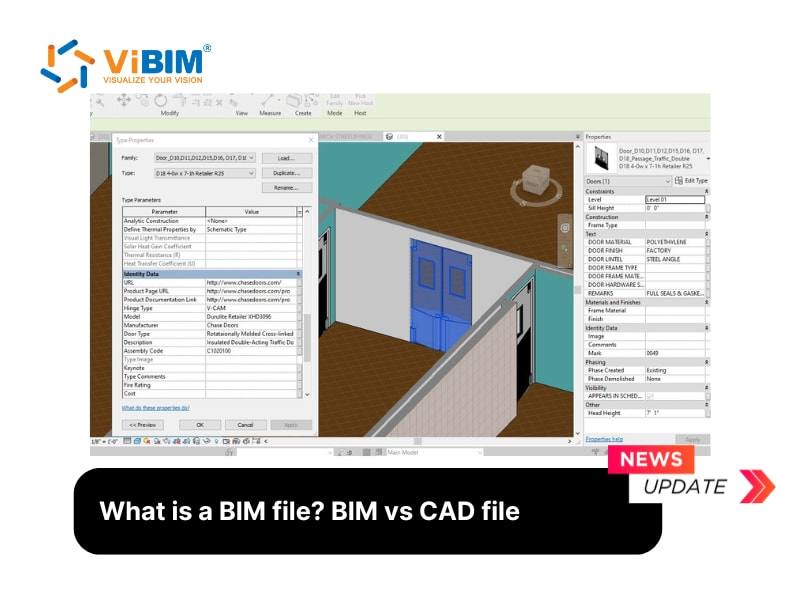
A BIM file is a digital container that stores both the 3D geometry of a building and the data attached to every element of that building. The geometry tells you the shape and location of a wall, beam, duct, or pipe. The data tells you what that element is made of, when it will be installed, who is responsible for it, how much it costs, and how it relates to every other element in the model. Strip the data away and you have a 3D drawing. Keep the data and you have a BIM file.
Q: How is this different from what is inside a CAD file?
A CAD file stores geometry as lines, arcs, and polylines, organized into layers. Each layer carries no intrinsic meaning beyond what the modeler typed into its name. A wall in a CAD file is a set of parallel lines on a layer called WALL. A wall in a BIM file is a parametric object that knows its thickness, height, fire rating, acoustic rating, manufacturer, and which floor it belongs to. The CAD file describes what the building looks like. The BIM file describes what the building is.
Q: What are the main categories of BIM file formats AEC teams encounter?
There are two camps. Proprietary (or native) formats are owned by the software vendor and optimized for their authoring tool. RVT belongs to Autodesk Revit. PLN belongs to Graphisoft ArchiCAD. NWF, NWD, and NWC belong to Autodesk Navisworks. These formats retain every feature the authoring tool supports, but they only open cleanly inside that tool. Non-proprietary (or open) formats are vendor-neutral standards designed for exchange between tools. IFC, BCF, IDS, and COBie are the four that matter most in 2026.
Q: When should I use a native format and when should I use IFC?
Use the native format when the file stays inside the authoring environment, when your team and your consultants all work in the same tool, and when you need to preserve features that only that tool understands (parametric families in Revit, parametric objects in ArchiCAD). Use IFC when you exchange models across disciplines that use different tools, when you submit deliverables to clients who require OpenBIM workflows under ISO 19650, or when you want a long-term archival format that survives software version changes. Most AEC teams in 2026 maintain both: a native master model for internal work, IFC exports for coordination and handover.
Q: What does IFC actually contain that makes it special?
IFC is a standardized schema developed by buildingSMART that defines how every building element should be described in a vendor-neutral way. A wall in IFC is an IfcWall with standardized property sets covering material, structural function, fire rating, and dozens of other attributes. Every BIM authoring tool that supports IFC exports walls into the same IfcWall structure. This is what makes federated models across Revit, ArchiCAD, AECOsim, and other authoring tools possible. Without IFC, every cross-platform exchange would require custom translators.
Q: What is BCF, and why does it matter for coordination?
BCF stands for BIM Collaboration Format. It is a lightweight file that carries issue tickets, screenshots, viewpoints, and comments about a federated model, without carrying the model itself. When a clash is detected in Navisworks or Solibri and routed back to the structural engineer, the BCF file tells the engineer exactly which element to look at, in which view, with which comment thread attached. BCF turns model coordination from email chains into a structured issue log.
Q: How does COBie fit into the picture?
COBie (Construction Operation Building Information Exchange) is a spreadsheet-style format that captures the asset data needed for facility management. When a building is handed over to the operator, COBie carries the equipment list, warranty terms, maintenance schedules, and spare parts data that the FM team needs to run the building. COBie can be extracted from a BIM file at any LOD that captures the relevant data, typically LOD 400 or above. For projects that include FM handover in the contract, COBie is often a deliverable.
Q: What are the 4D and 5D dimensions of a BIM file?
The 3D dimension is geometry. The 4D dimension is time, where each element is tied to a construction sequence and schedule. A 4D BIM file can show you the building's state at any week of construction. The 5D dimension is cost, where each element carries a unit price and the whole model produces a quantity takeoff and cost estimate. Software like Navisworks (TimeLiner module) and Vico Office handle the 4D and 5D layers on top of the native BIM file.
Q: What happens to a BIM file at handover?
Three things, depending on the contract. The native file (RVT, PLN) goes to whoever will maintain the model. An IFC export goes to the client or operator as a vendor-neutral archive. A COBie deliverable carries the FM-relevant data. Some contracts require all three. Others require only the IFC and COBie. The point is that the BIM file does not end when construction ends. It carries forward into the operations phase of the building's life.
Q: What should I check before accepting a BIM file from a partner?
- Format version: confirm IFC 2x3 or IFC 4 depending on contract requirement.
- LOD specification: verify the level of development matches what was promised.
- Coordinate system: the model origin and shared coordinates must match the project survey.
- Family naming and parameters: parameters carry the data; missing parameters mean missing data.
- Federated model behavior: open the file in Navisworks or your coordination tool to confirm it federates cleanly with adjacent disciplines.
Accepting a BIM file blindly leads to the worst kind of surprise at coordination: discovering at clash detection that the partner's model was never actually checked. A 15 minute review before signoff saves weeks of rework.
Reference: https://vibimglobal.com/blog/what-is-a-bim-file/
See more:
- https://vibim.wordpress.com/2026/05/23/what-is-a-bim-file/
- TUMBLR_URL_PENDING
- https://vibim-scan-to-bim.github.io/vibim-syndicate/what-is-a-bim-file/
- https://vibimscantobim.weebly.com/blog/what-is-a-bim-file
- https://sites.google.com/vibim.com.vn/vibimglobal/blog/what-is-a-bim-file
ViBIM
10th Floor, CIT Building, No. 6, Alley 15, Duy Tan Street, Dich Vong Hau Ward, Cau Giay District, Hanoi, Vietnam
(+84) 944.798.298
https://vibimglobal.com/